
DG IMAGE HOTSPOT · DIVI 5 & DIVI 4
Divi Image Hotspot Module
Pin notes to any photo. Visitors hover or tap a spot and a tooltip opens with a title, text, a picture or a whole Divi layout.
Icon, image or text spots
Hover or click
12 tooltip placements

Pancake lenses
4K per eye in a headset 40% slimmer than before.
Spatial audio
Speakers sit just off the ear, so you still hear the room.
Hand tracking
No controllers needed: pinch, swipe and point.
Balanced strap
The battery sits at the back for all-day comfort.
LIVE EXAMPLES
Divi image hotspot examples
Six sections, each one DG Image Hotspot styled for a different business. Hover or tap the spots to open the tooltips.
01
Hearth & Home · Shop the room for a furniture store
ICON SPOTS · PULSE · PRODUCT TOOLTIPS WITH A LINK
THE LIVING ROOM EDIT
Love the room? Shop every piece.
Point at a pin to see the piece, its price and a link. The tooltip stays open while you move into it, so the link can be clicked.
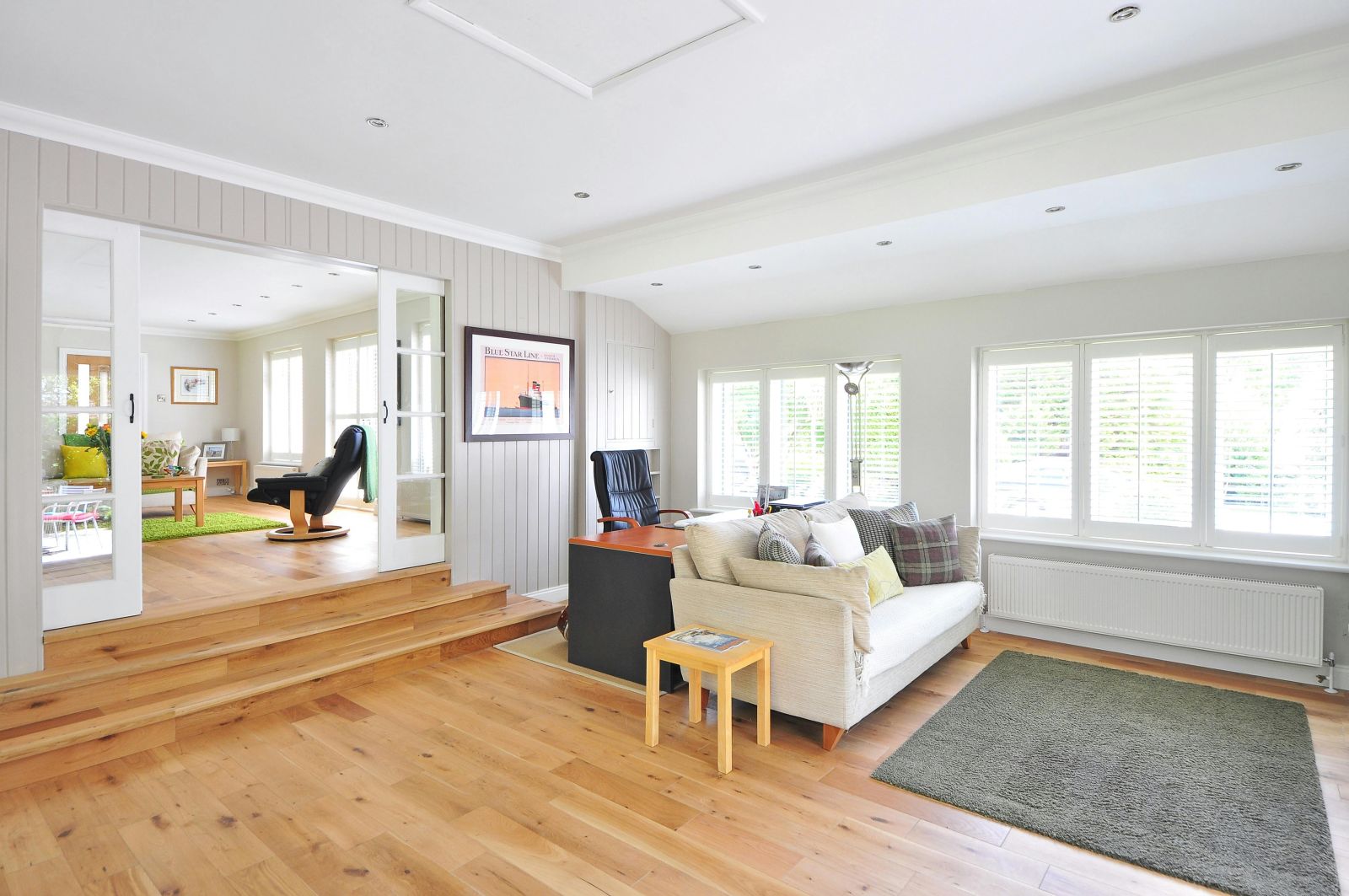
“Blue Star” print
Framed giclée, 50 × 70 cm · £120
View product →
Arc floor lamp
Brushed steel, dimmable · £245
View product →
Hartley 3-seat sofa
Washed linen, feather cushions · £1,490
View product →
Pine side table
Solid pine, 45 cm tall · £95
View product →
Moss wool rug
Hand-tufted, 160 × 230 cm · £380
View product →
02
Northline Trails · A trail map for a hiking guide
TEXT SPOTS AS LABELS · SCALE ANIMATION · DARK TOOLTIPS
BANFF NATIONAL PARK
THE ICEFIELDS PARKWAY, ONE STOP AT A TIME
Text spots work as map labels. Hover a place to see the walk, its length and how hard it is.

Peyto Lake viewpoint
1.2 km return · 25 min · easy. Best before 10am, when the water is calm.
Caldron Peak
2,917 m · a full-day scramble for experienced hikers only.
Mistaya Valley
Wide, forested and quiet. Look out for moose near the river.
Bow Summit trail
5.8 km return · 2 h · moderate, with wildflowers in July.
03
Studio Vale · Shop the look for a fashion store
NUMBERED SPOTS · PERSPECTIVE ANIMATION · LIST BESIDE THE PHOTO

Cropped bomber · £89
Blush nylon with a soft drawstring hem.
Everyday tee · £24
Organic cotton in a relaxed, boxy cut.
Canvas tote · £45
Fits a laptop, with an inside zip pocket.
Tapered chinos · £59
Stone twill with a little stretch.
SHOP THE LOOK
Off-duty, on the city stairs
01
Cropped bomber
Blush nylon, relaxed fit
£89
02
Everyday tee
Organic cotton, white
£24
03
Canvas tote
Cream canvas, leather strap
£45
04
Tapered chinos
Stone twill, high rise
£59
Numbered text spots match the list, and each tooltip tilts in with the Perspective animation.
04
Lumina · Ingredients for a skincare brand
CLICK TO OPEN · SHIFT TOWARD ANIMATION · SMALL ICON SPOTS
LUMINA · CLEAN SKINCARE
What goes into your routine
Tap a bottle to read what is inside. On click, a tooltip stays open until you tap somewhere else.

Golden facial oil
Rosehip and squalane for dry skin. Two drops, morning and night.
Vitamin C drops
15% vitamin C with ferulic acid to brighten dull skin.
Daily moisturiser
Light gel-cream with niacinamide and SPF 30.
Hydrating serum
Three kinds of hyaluronic acid for a plump, dewy finish.
Overnight balm
Shea and ceramides to repair while you sleep.
05
Atrium · A space tour for a coworking office
ICON PER SPOT · RIPPLE PULSE · TOOLTIPS BELOW
// FLOOR 3 · MEETING SUITE
Take the tour before you book
Every spot has its own icon, and the tooltips open below the spot. A ripple pulse shows where to point.
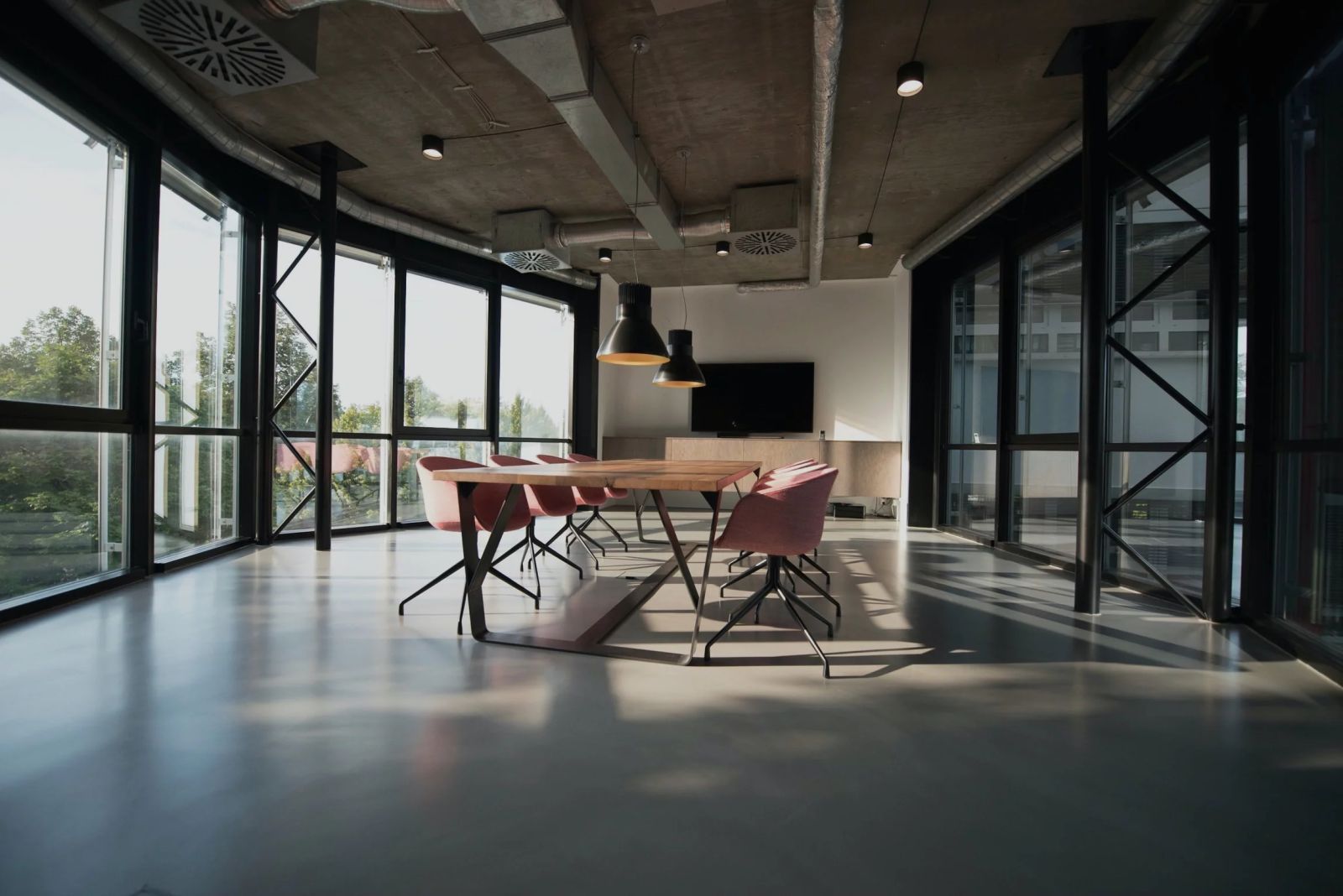
Seats 10
Oak table with power and USB-C at every seat.
75-inch screen
One cable for laptops, plus a camera for video calls.
Warm lighting
Dimmable pendants for long workshops.
Park views
Floor-to-ceiling glass on two sides.
Coffee bar
Free barista coffee, tea and fruit all day.
06
Umami · What is in the bowl, for a restaurant
TOOLTIP FOLLOWS THE CURSOR · NUMBERED SPOTS · BOLD COLOURS
UMAMI KITCHEN
Teriyaki chicken bowl, piece by piece
Move over the bowl: each tooltip follows the cursor, so the note stays next to what you are looking at.
£13.50 · 640 kcal · gluten-free on request
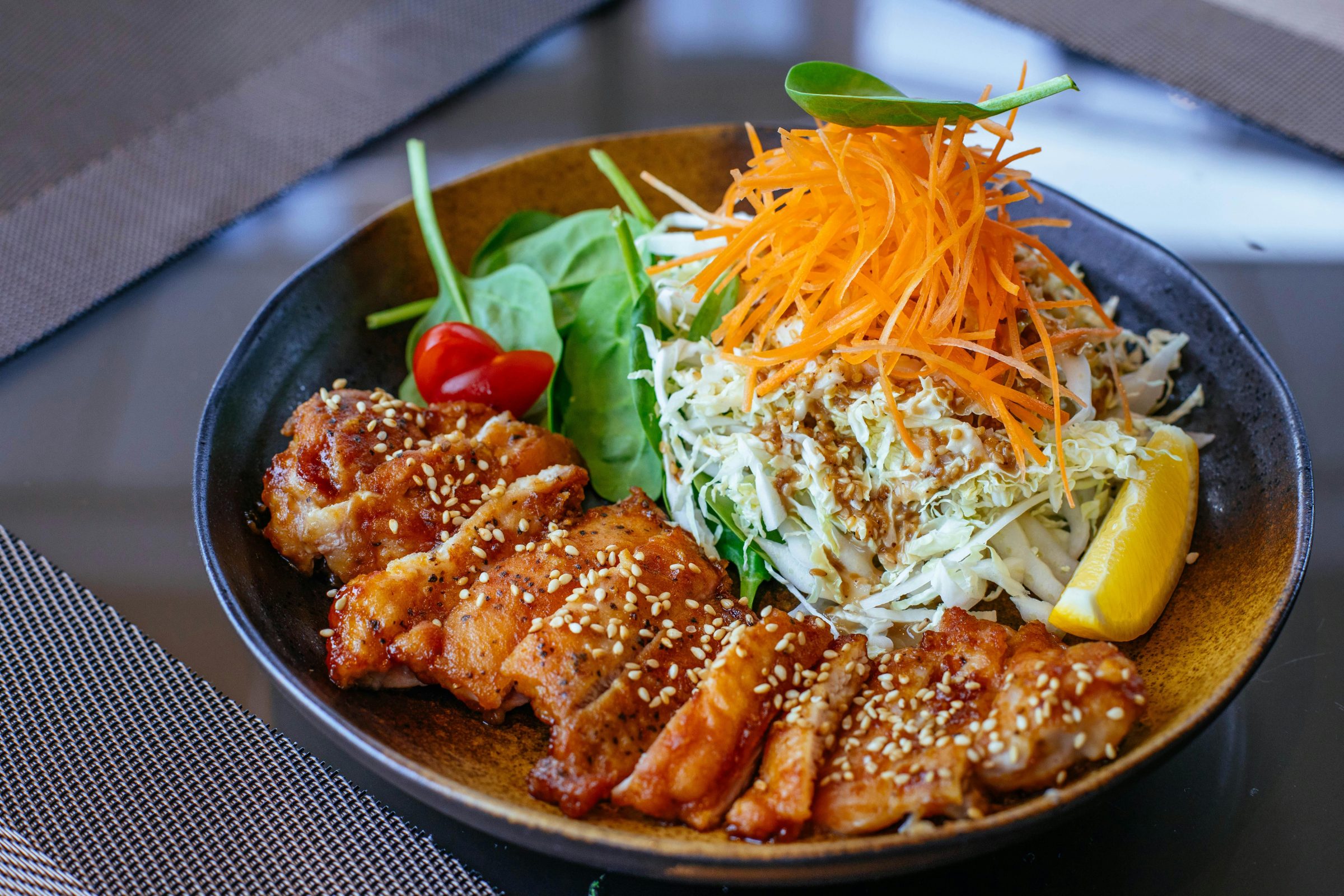
Teriyaki chicken
Thigh, grilled and glazed with soy, mirin and ginger.
Carrot ribbons
Shaved thin and dressed in rice vinegar.
Sesame slaw
White cabbage with a toasted sesame dressing.
Lemon wedge
Squeeze it over the chicken to cut the sweetness.
Baby spinach
With a cherry tomato, for something fresh.
PLAYGROUND
Try the hotspot settings
Each one is its own Image Hotspot with one setting changed. Hover the spots to compare.
Three kinds of spot
Icon spot
Any icon from the Divi icon library.
Icon spot

Image spot
A small photo or logo as the marker.
Image spot
Text spot
A word or a number as the marker.
Text spot
Pulse animations
Pulsating
A looping animation that draws the eye to the spot.
Pulsating
Pulsating 2
A looping animation that draws the eye to the spot.
Pulsating 2
Pulse
A looping animation that draws the eye to the spot.
Pulse
Ripple
A looping animation that draws the eye to the spot.
Ripple
Tooltip animations
Fade
How the tooltip appears.
Fade
Scale
How the tooltip appears.
Scale
Shift away
How the tooltip appears.
Shift away
Shift toward
How the tooltip appears.
Shift toward
Perspective
How the tooltip appears.
Perspective
FEATURES
Image Hotspot features
Everything is set in the Divi Builder, with no code.
Icon, image or text spots
Use any Divi icon, a small image or a word or number as the marker.
Placed in percent
Spots are positioned as a percentage of the photo, so they stay on the right object at every screen size.
Tooltips with image and text
Add a picture and a short text to each tooltip, with its own colours, spacing and border.
Divi layouts in tooltips
Pick a layout from the Divi Library to show buttons, forms or anything else in a tooltip.
12 placements
Open the tooltip above, below, left or right of the spot, at the start, centre or end.
5 tooltip animations
Fade, Scale, Shift away, Shift toward and Perspective.
Hover, click or both
Choose the trigger, let the tooltip follow the cursor, or keep it open so its links can be clicked.
Pulse animations
Four looping effects that show visitors where the spots are.
HOW TO
How to add hotspots to an image in Divi
1
Add the module
In the Divi Builder, add DG Image Hotspot and upload your photo.
2
Add the spots
Add a Hotspot Item for each spot and pick an icon, an image or a text label.
3
Place each spot
Set its left and top position in percent, then write the tooltip text.
4
Style the tooltips
Choose the trigger, placement and animation, set the colours, then save.
FAQ
Image hotspot FAQ
Short answers about the Image Hotspot module. Open as many as you like.
More questions? Ask our team, we reply within 24 hours.
A Divi module that adds spots to a photo. When a visitor hovers or taps a spot, a tooltip opens with a title, text, an image or a Divi Library layout.
Yes. Set the trigger to hover, click, or both. Click works well on touch screens and for tooltips with links.
Yes. Add a link in the tooltip text, or show a Divi Library layout with buttons. Turn on Interactive so the tooltip stays open while visitors move into it.
Yes. Each spot is placed as a percentage of the image width and height, so it stays on the same object as the photo scales. You can also set a smaller spot size for phones.
Yes. A spot can be any icon from the Divi icon library, an image you upload, or a short text label.
Yes. The module is available in both Divi 5 and Divi 4.
REVIEWS
Voices of Satisfaction
Hear directly from our cherished clients.
★★★★★
“
DiviGrid made my portfolio look professional without any developer help. The filterable grid module saved me hours of work!

Mohammad Sobhy
★★★★★
“
Customer service is fantastic the DiviGrid and Divi Image Mask Slider are winners and that starts with a great team backing them. Lots of unique options thanks for the support

Tim Kerney
★★★★★
“
It’s a wonderful world to discover. However, I would appreciate some improvement in: – translation (french for instance) – documentation (the search engine is too weak).

Pierre Moser
★★★★★
“
I’ve had almost no issues with Divigrid – like maybe 2 in one year. Their support was immediate and with a resolution. I’ve been working with WordPress & Divi for over six years now and have tried many plugin module developers. Divi Grid has given me consistently excellent results so their plugins are my primary choice.

Bonnie Unsworth
★★★★★
“
A fantastic selection of plugins which are intuitive to use. When I had a query support was on hand and very quick to resolve my question.

Heather Pedley
★★★★★
“
Great software at an amazing price. I like it.

Pedro de Pradines
★★★★★
“
This is a great plugin. there is no doubt. work well all features are like magic. requesting you divigrid team to create tutorials also on YouTube for some advanced options and open a forum site. It has vast features to talk about.

Shezan Ahmed
★★★★★
“
I’m relatively new to Divi, but found this plug-in to be very helpful making a site just the way I want to see it without having to jugle other items.

Thomas Bogan
★★★★★
“
I’m so happy with customer service! While I’m not a beginner with Divi I needed help and it came quickly. I’m really enjoying everything I can do with the content grid and can’t wait to get into the list grid!

Valerie Robitaille
Explore more DiviGrid modules
Image Accordion
Photo panels that open on hover or click.
Interactive Card
Flip cards that show a back side on hover or click.
Advanced Image Carousel
Sliding images with a synced content panel.
Masonry Gallery
A filterable photo wall with hover effects.
GET STARTED
Photos that answer questions
Image Hotspot comes with DiviGrid, together with 50+ other Divi modules. From $19 a year.
14-day money-back guarantee
Secure checkout
Support replies within 24 hours